

Accounting Software for Contractors in the UAE: The Complete Guide
Accounting Software for Contractors Despite the fact that the UAE has minimal taxation, companies can…
Value Added Tax (VAT) verification is a tedious but crucial step for businesses registered in the UAE. The Federal Tax Authority has increased its enforcement and imposes penalties for incorrect VAT practices. Verifying a VAT number (Tax Registration Number) prevents compliance issues, which in turn protects your business from penalties and denied VAT refunds.
This matters more in 2025 with the updates in EmaraTax digital systems. The Federal Tax Authority (FTA) reports that it is expanding its use of new digital technologies and intensifying compliance monitoring. In 2024 alone, the FTA conducted 93,000 field inspection visits — a 135% increase from the previous year. As they continue to intensify audits and automated checks, businesses are seen relying more on digital verification tools to avoid mistakes.
This practical, step-by-step free guide is for business owners, finance teams and freelancers working with UAE clients. Anyone issuing or receiving VAT invoices in the UAE needs to be aware of how to verify a valid 15-digit TRN through the official FTA portal, and common issues and how to fix them.
The VAT Number or otherwise known as the Tax Registration Number (TRN) is the identification number given to a business upon completion and approval of their VAT registration. The VAT number is a unique 15-digit identifier issued by Federal Tax Authority, and it is a business requirement to have it listed in your invoice for all your transactions. The VAT Number is only needed when you cross a certain threshold in supplies, as VAT tracks the value added at each stage of the supply chain.
In that note, the VAT number is considered a mandatory legal requirement for businesses exceeding the AED 375,000 taxable supplies threshold for the rolling previous 12 months. The company’s VAT number allows businesses and customers to confirm that a company is legally recognized under the country’s tax system.
Note that the VAT Tax Registration Number in the UAE is different from the Corporate Tax Tax Registration Number (otherwise known as CT TRN). The Corporate Tax TRN is used for Corporate Tax returns and CT-related dealings with the FTA.
The structure of the TRN is as follows:
In short – upon submission and approval of the VAT registration form, having the VAT number will serve as proof that this is a VAT registered business in the UAE.
Verifying the VAT registered number in the UAE is equally as important for both businesses and customers. There are certain benefits in verifying that legal entities carry a valid VAT number. Here are some of the reasons why you need to check first and always have your VAT number ready before transacting in the UAE:
In summary, doing your part verifying TRNs helps maintain accurate tax reporting, further reducing legal headaches and complications. For one, the paper trail helps avoid denial of Input VAT Credit for invoices issued by invalid or unregistered suppliers. Overall, having a valid VAT number strengthens business credibility and avoids disputes with clients or auditors.
The UAE’s equivalent of a VAT information exchange system is overseen by the Federal Tax Authority (FTA) portal. In other words, this portal is considered as the primary system for managing and exchanging VAT information within the UAE.
Important note:
TRN verification is a public tool and doesn’t require a login. Anyone who is claiming to verify on your behalf for a fee is most likely a scam.
To check digits of the VAT number, here are the steps:
Step 1: Visit the official UAE FTA portal: https://tax.gov.ae/en/default.aspx and on the right panel of the website, click the icon that says “TRN” under the “VAT” icon
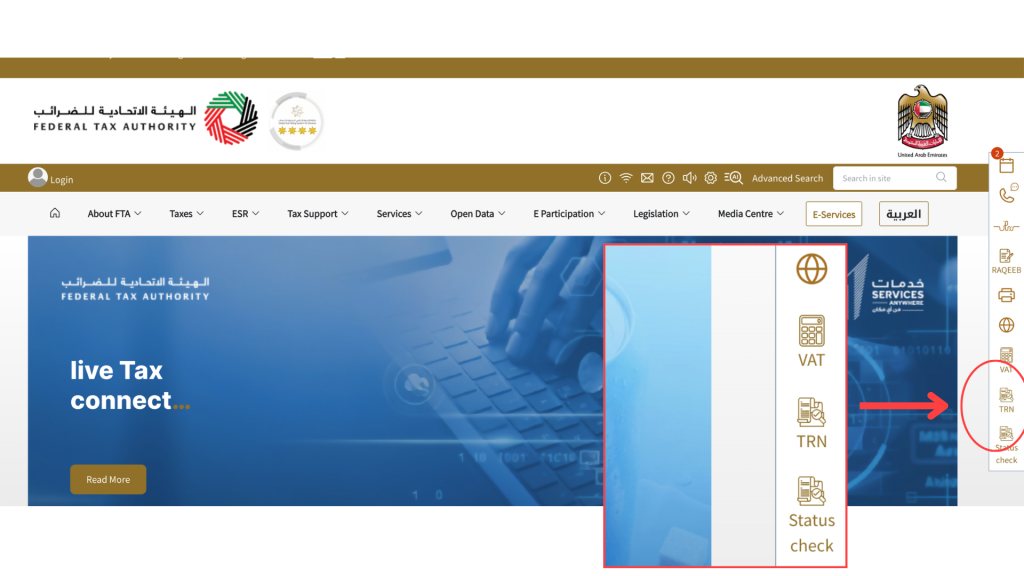
Step 2: A window will open that includes the TRN verification field. Simply input the 15-digit vat number in the search field and complete the captcha verification to continue.
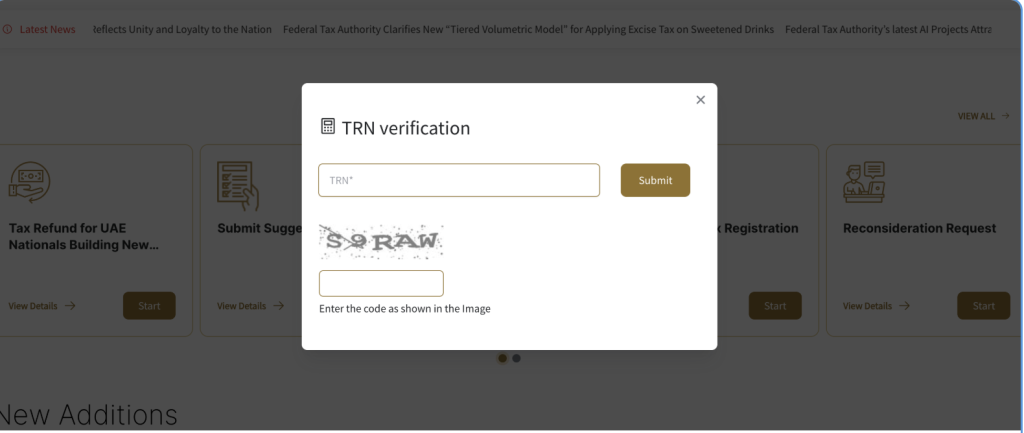
Step 3: After you click submit, the portal confirms whether the TRN is active by seeing the registered businesses’ name in the box together with the number. A wrong or unregistered number in the UAE will list as blank under the Name column
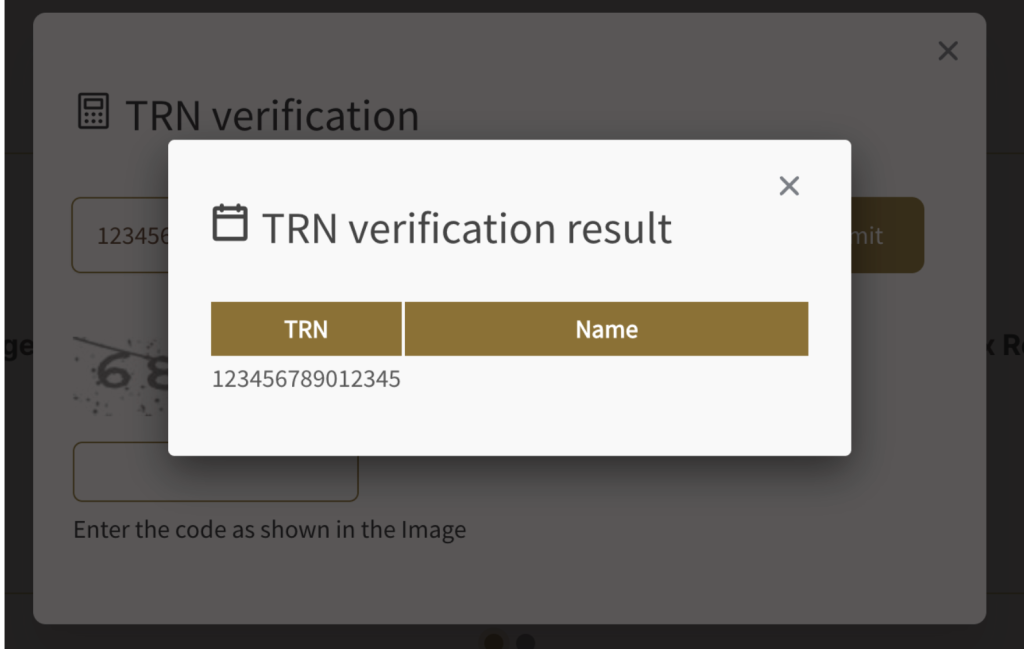
Wrong VAT number will reflect a blank business name.
You can use the UAE’s EmaraTax portal to administer taxes in the UAE and fulfill your VAT obligations. EmaraTax requires you to log in before you can use. Since this is required for VAT registration, once you have obtained the VAT registration certificate, you most likely would already have a working account that you can use for the duration of your business.
Value added tax is implemented by the government effective 2018, and since then, they have revised policies depending on the context and needs of its businesses. While certain details have changed over time, knowing the rules for mandatory and voluntary registration is a good first step to understanding UAE tax laws.
Voluntary Registration: Legally, the voluntary threshold is based on taxable supplies and imports, or taxable expenses. Businesses who exceed the voluntary registration threshold of AED 187,500 in annual taxable supplies and imports or expenses may register voluntarily in order to claim vat refunds early. Additionally, if the business is importing, registering enables owners to use the reverse charge mechanism (RCM), which is cash-neutral vs paying cash VAT at the borders.
Similarly, a startup with big taxable expenses and low revenue can register voluntarily to claim benefits of voluntary registration.
Mandatory Registration: Businesses exceeding the threshold of AED 375,000 in taxable supplies within a span of 12 months must settle a registration date within 30 days before penalties can apply. Reversely, owners foreseeing that they will pass this threshold in the next few months can proactively apply in order to remain compliant.
VAT registration applies to mainland companies, free zone entities, e-commerce sellers, freelancers, and service providers conducting business operations within UAE; although some goods or services may qualify for either a 0% VAT rate or full exemption, provided they meet the required conditions.
While VAT can be voluntary, it is all businesses’ responsibility to ensure that all business income and expenses must be properly kept accurate and up-to-date in their financial records so they can determine when VAT registration threshold is passed and becomes mandatory.
o register for a VAT number, you need to sign up for an EmaraTax account through the FTA’s website and fill up the registration form with all the required documents properly submitted. You will be notified of your registration status together with your VAT registration number upon approval.
Please note that there is no registration fee needed to access the platform, but it does help to have a professional navigate the complex UAE tax regulations with you. This can entail certain service costs.
According to the Federal Tax Authority, you need to prepare and collect all the required documents, ensure verified information is accurate, and then submit the following. Keep in mind that the requirements vary depending on the type of legal entity.
Accepted file formats: PDF and DOC. Maximum file size per document should be 15 MB or else you won’t be able to upload it in the EmaraTax portal.
By coming prepared, you reduce the risk of getting your application declined even before you even open your VAT registration form; often, businesses get declined due to insufficient documents or missing information. You can also get fined if the authorities find wrong information that hasn’t been amended proactively.
UAE tax regulations may seem strict, but it helps to be aware of typical issues and remedies available should you encounter this with the Federal Tax Authority (FTA). You can easily avoid some of these issues by being mindful:
Some easy solution fixes if you encounter any of these issues:
Skrooge combines advanced AI automation with the oversight of seasoned finance and accounting specialists. It acts like an AI CFO handling sorting, reconciliation, filing, and reminders flawlessly and instantly. Our technology can flag missing TRN, mismatched names, invalid formats, and track taxable transactions without the tedious manual verification.
Skrooge can manage massive volumes of invoices for any type of a client in minutes and reduce risk of penalties.
We are not software reliant to get the job done. Our team of human experts can devote their time to strategic tasks like structuring tailored charts of accounts and solving complex tax challenges for our clients. Because of our AI-powered accounting and VAT automation software, you can maximize our professional accountants’ expertise and services for complex compliance issues, and reduce errors to keep you audit-ready with accurate, real-time VAT records.
To ensure smooth business operations, it helps to stay compliant and be proactive in managing tax compliance:
NOTE:
You can read more and download sample invoice templates here: Proper tax invoice format UAE
Simply visit the official UAE online portal: https://tax.gov.ae/en/default.aspx and on the right side of the website, click the icon that says “TRN” under the “VAT” icon. Type the details, hit submit, and you should see the business carrying the same VAT number.
VAT verification, while tedious, becomes necessary once you determine someone is using an invalid VAT number. Using an invalid VAT number can have serious consequences for your business. The Federal Tax Authority (FTA) may reject claims for input tax credit if the supplier’s registration number is not genuine or properly documented. Additionally, such non-compliance can trigger administrative penalties and increase your risk of a full tax audit.
You can find it in valid VAT invoices, their TRN certificate (sometimes asked as part of due diligence), or by simply asking the supplier.
For both a full tax invoice and simplified tax invoice, the supplier name must be present together with their registered business address and VAT registration number. Failure to comply or supplying incorrect information can amount to a AED 2,500 fine for each detected case.
Typically, VAT registration process take 2 to 3 working weeks to complete. You can read more about the VAT registration process in the UAE in our article here.
Under UAE tax laws, VAT number will refer to the Tax Registration Number given for VAT registration, which is not to be confused with the Corporate Tax TRN (or CT TRN) used for corporate tax registration. Both are 15-digit unique identification numbers, but they refer to different tax registrations and not interchangeable. CT TRN cannot be used for VAT purposes and vice versa.
The VAT Number must appear on tax invoices, VAT returns and all documents related to VAT tax compliance. The Corporate Tax TRN is used for filing corporate tax returns and Federal Tax Authority CT portal access.
Yes, there is no need to log in in order to verify a VAT number in FTA portal.
Make sure to recheck that you input the digits correctly. If it still fails, contact the supplier to ensure that the number is accurate.
In some cases, you can wait a bit longer and input again later, since it could be that the system is currently down. Alternatively, you can contact relevant authorities or FTA support to report problems.
VAT registration applies to mainland companies, free zone entities, e-commerce sellers, freelancers, and service providers conducting business operations within UAE, although some goods or services may qualify for either a 0% VAT rate or full exemption, provided they meet the required conditions. There are options for a voluntary and mandatory registration, depending on where your business is at that certain period.
Skrooge combines powerful AI with expert accountants to act like your always-on CFO, sorting, reconciling, and filing documents quickly and accurately. It can process thousands of invoices across multiple clients at a speed no human team can match, ensuring seamless tax-invoice and VAT compliance. This frees our specialists to focus on strategic work like building tailored charts of accounts and delivering high-value tax advisory services.
Our primary goal is to help you navigate the UAE tax laws effectively. To get started, simply book a consultation call. Through our fast 15-minute VAT consultation process, simply share with us your recent VAT filings and a sample of invoices to get a clear view of next steps.
Once all is in order and confirmed, onboarding will be done with professional accountants who will conduct further diagnosis of your business.
Thank you!
We've received your request and will get back to you shortly.
Loading...